← Features Management

Your attendance rates, up to the second

Every signature feeds your dashboards live. Attendance rates by class, by teacher, by course, teaching hours and out-of-class tasks: ScolaSign turns sign-in into management indicators, without a single spreadsheet to maintain by hand.

How it works

From signature to indicator, with no retyping

You no longer aggregate anything. The figures build up with each sign-in and can be viewed at any time.

1Step 1

Measure

Every attendance, absence, late arrival and absence note automatically feeds the attendance counters, class by class and learner by learner.

2Step 2

Analyse

Filter by class, teacher, course or period. Spot at a glance attendance that is slipping or a course that is causing problems.

3Step 3

Export

One click gives you a CSV export for your analyses or a PDF ready to attach to a teaching report or a funding file.

Dashboards

The pulse of attendance, on one screen

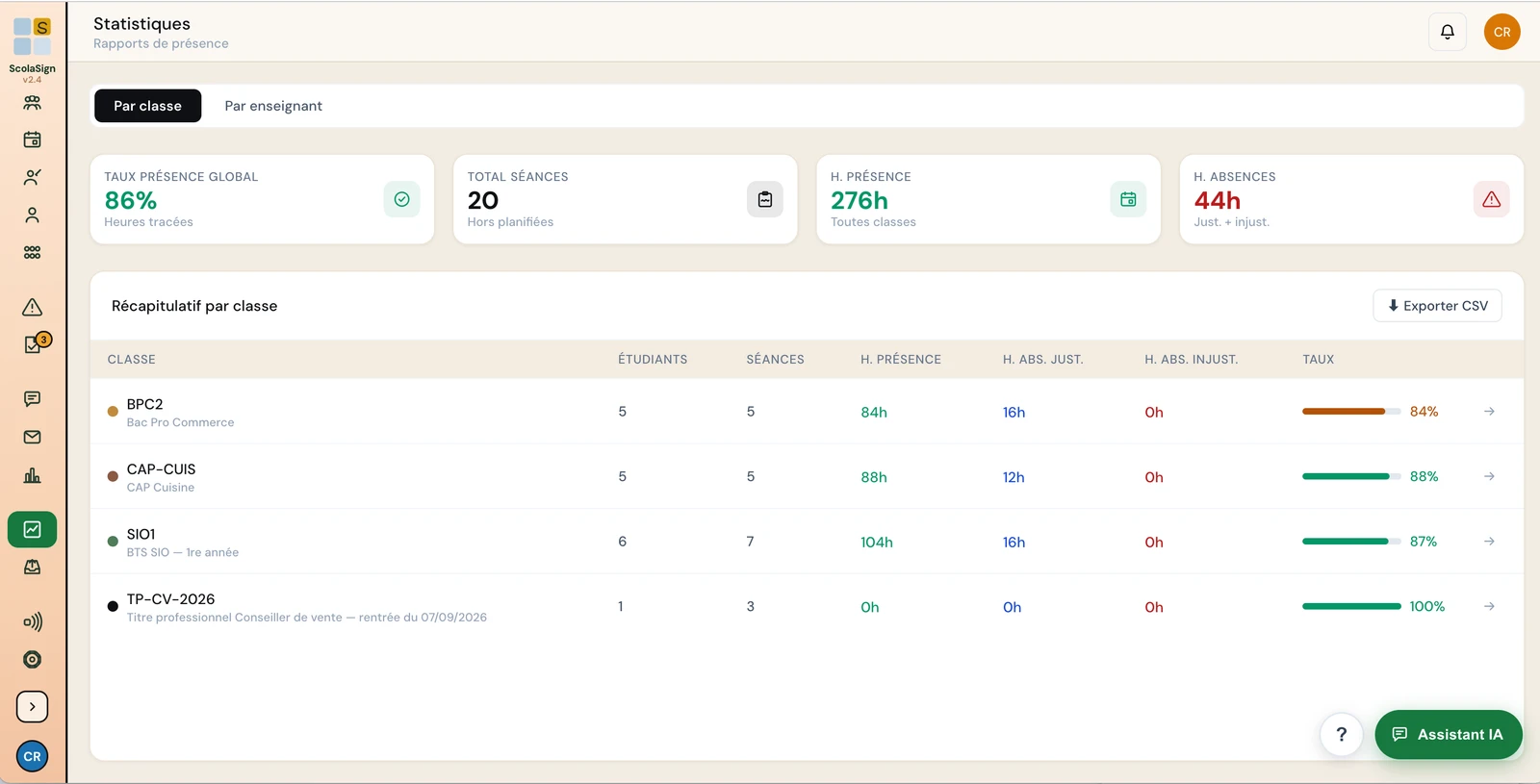
Overall attendance rate, by class, by teacher, by course; hours delivered; out-of-class tasks. It is all there, updated with every signature: no more waiting until the end of the month to know where you stand.

  • Attendance rates by class, teacher and course
  • Teaching hours and out-of-class tasks counted
  • Real-time updates, with no manual consolidation
  • Trainer view limited to their own classes
See scheduling →
ScolaSign console: attendance analytics dashboard with overall rate, hours of attendance and absence, summary by class (interface in French)
CSV & PDF exports

Figures ready to leave the tool

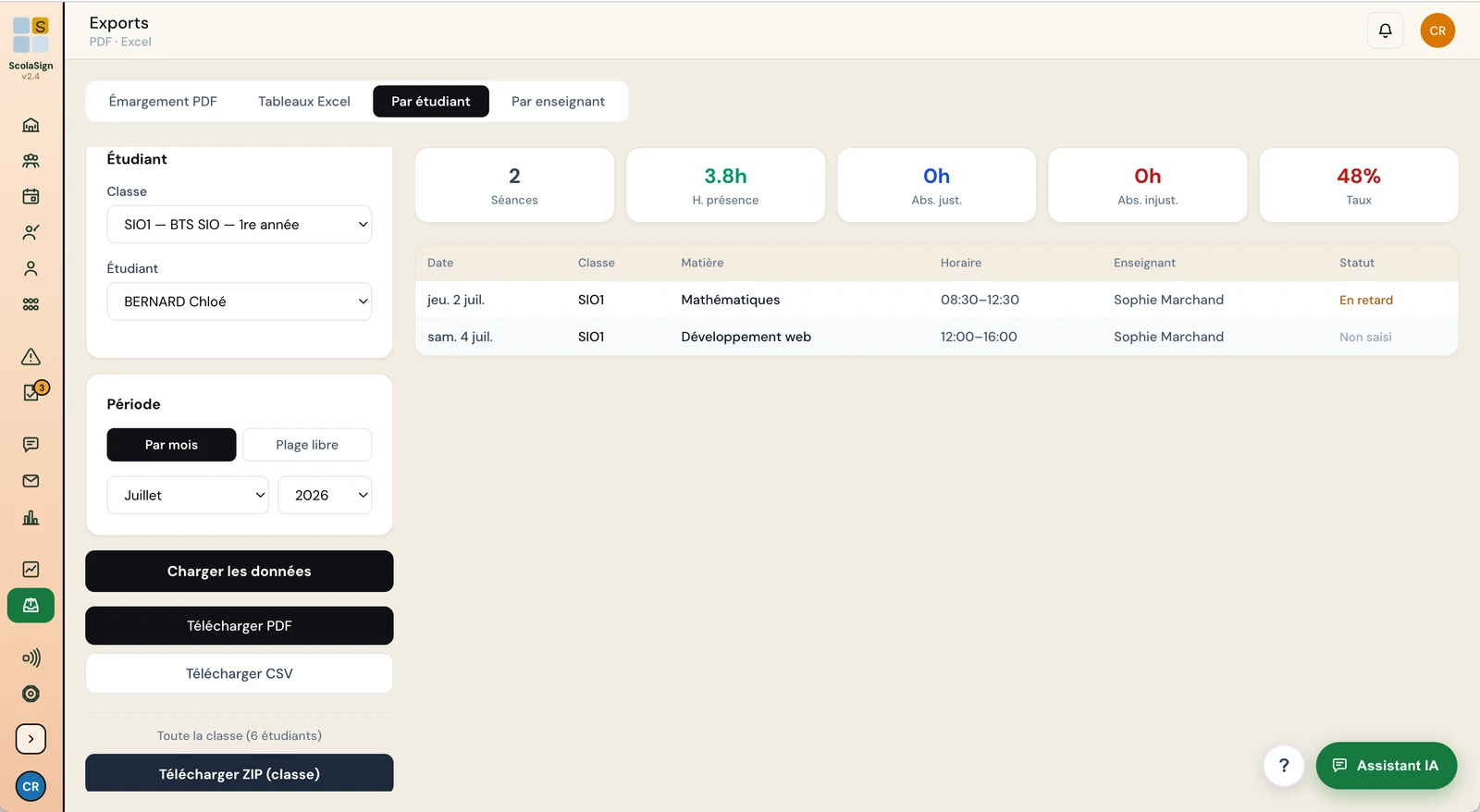
Your indicators are not trapped on screen. Export them as CSV for your own analyses, or as a timestamped PDF for a report, a class council or a funding file.

  • CSV export by session, group or learner
  • Timestamped PDF export, ready to archive or send
  • Filterable scope (class, period, course)
  • Consistent with your signed attendance sheets
See how the evidence is protected →
ScolaSign console: attendance export by learner with sessions, hours, attendance rate, and PDF, CSV or ZIP download by class (interface in French)
Going further

Analytics fed by everything else

The figures come from the schedule and from sign-ins, and lead to the documents you show to funders and inspectors. ScolaSign was built to meet some of the strictest attendance-evidence requirements in Europe: France's Qualiopi quality certification and the audits of French public training funders. Those rules apply only in France, but the same rigour serves training centres and schools everywhere.

Frequently asked questions

Attendance analytics: frequently asked questions

Are the statistics really real-time?

Yes. As soon as a signature is recorded, an absence note is approved or a late arrival is noted, the counters are recalculated. There is no manual consolidation and no import to run.

Does a trainer see the figures for the whole organisation?

No. A trainer's view is limited to their own classes and learners. Overall dashboards and comparisons between teachers are reserved for admins and managers.

Which export formats are available?

CSV, to rework the data in your usual tool, and timestamped PDF, for a document ready to archive or send: a teaching report, a class council, a funding file.

Are out-of-class tasks counted?

Yes. Beyond teaching hours, ScolaSign counts scheduled out-of-class tasks, for a volume of hours that reflects teachers' actual workload.

Manage attendance instead of putting up with it

Try ScolaSign free for 14 days and watch your dashboards build themselves, sign-in after sign-in.