← Features Feature

Internal messaging

Instant messaging built into your attendance platform. Trainers, learners and admin staff talk in one place, under your centre's name, without personal WhatsApp accounts.

Communication that stays in the platform

All of your training centre's communication, in one place

How many important messages get lost in private WhatsApp groups, on personal numbers your centre has no control over? ScolaSign messaging brings these conversations back to where the timetable, attendance and absence notes already live.

It works like a modern instant messenger, familiar to everyone from the first use. Teaching and admin staff use it in the management console; learners and their parents, tutors and employers use it in the mobile app. No extra software to install, no personal numbers to share: your organisation's communication takes place in a space that belongs to you, with your centre's logo. Trainers, learners and admin staff finally have a single, traceable channel suited to a training centre.

Conversations

Direct or in groups,
as needed

From a learner's question to a trainer to an announcement for a whole cohort, every exchange has the right format.

  • Direct conversations trainer ↔ learner, learner ↔ learner, or with admin staff
  • Named groups (class, project, cohort) with member management
  • Separate Chats and Groups tabs, clear at a glance
  • Searchable organisation directory to find the right person
Create my trial account →
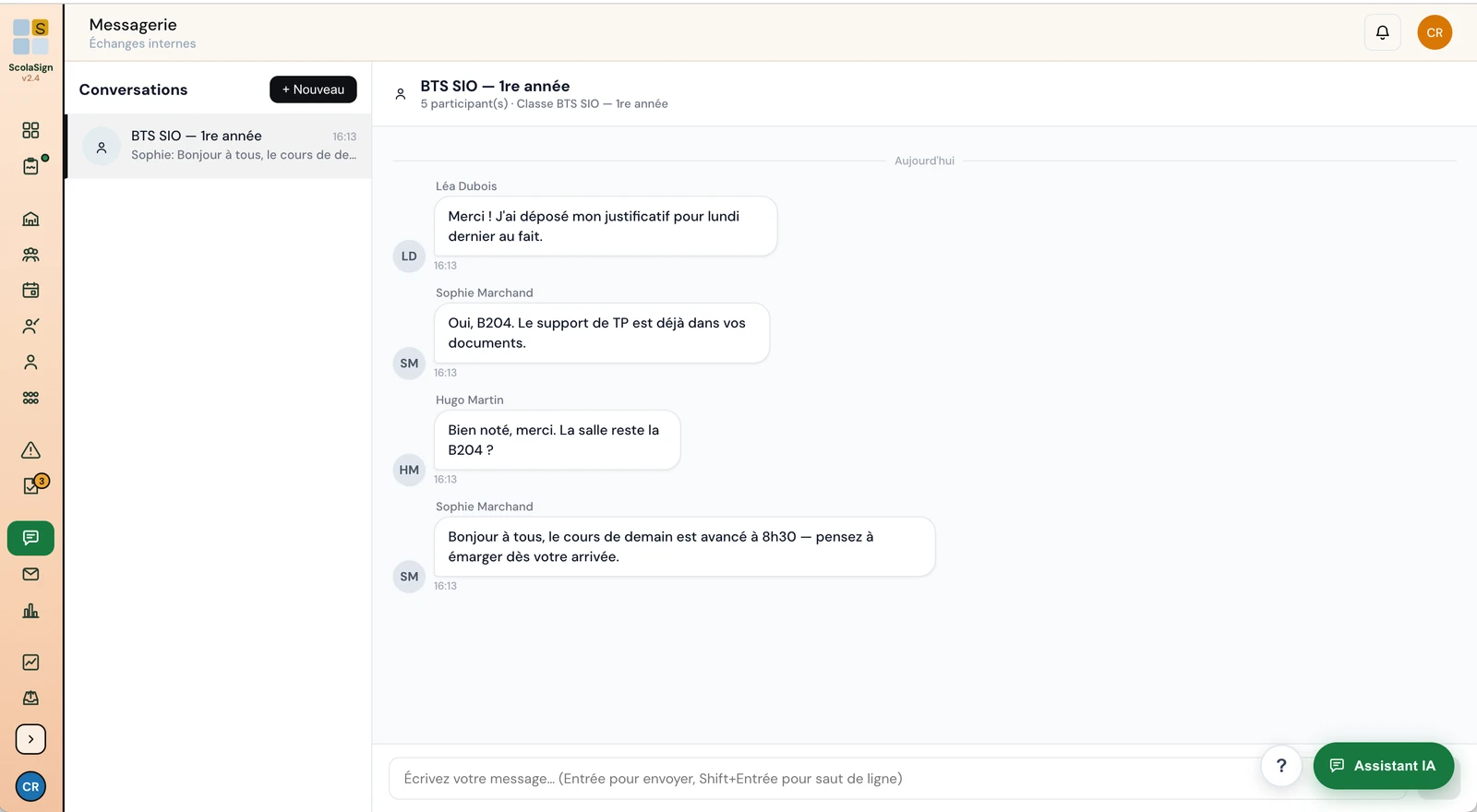
ScolaSign console, internal messaging: class conversation between the trainer and learners (French interface)
Voice & notifications

Voice messages and
real-time notifications

Sometimes a voice message says in ten seconds what would take a long text. And a well-timed notification prevents a missed appointment.

  • Voice messages recorded by pressing and holding the microphone
  • Converted to a universal audio format when sent, for playback on a wide range of devices
  • Push notifications, even when the app is closed
  • In the management console and in the mobile app
See the mobile app →
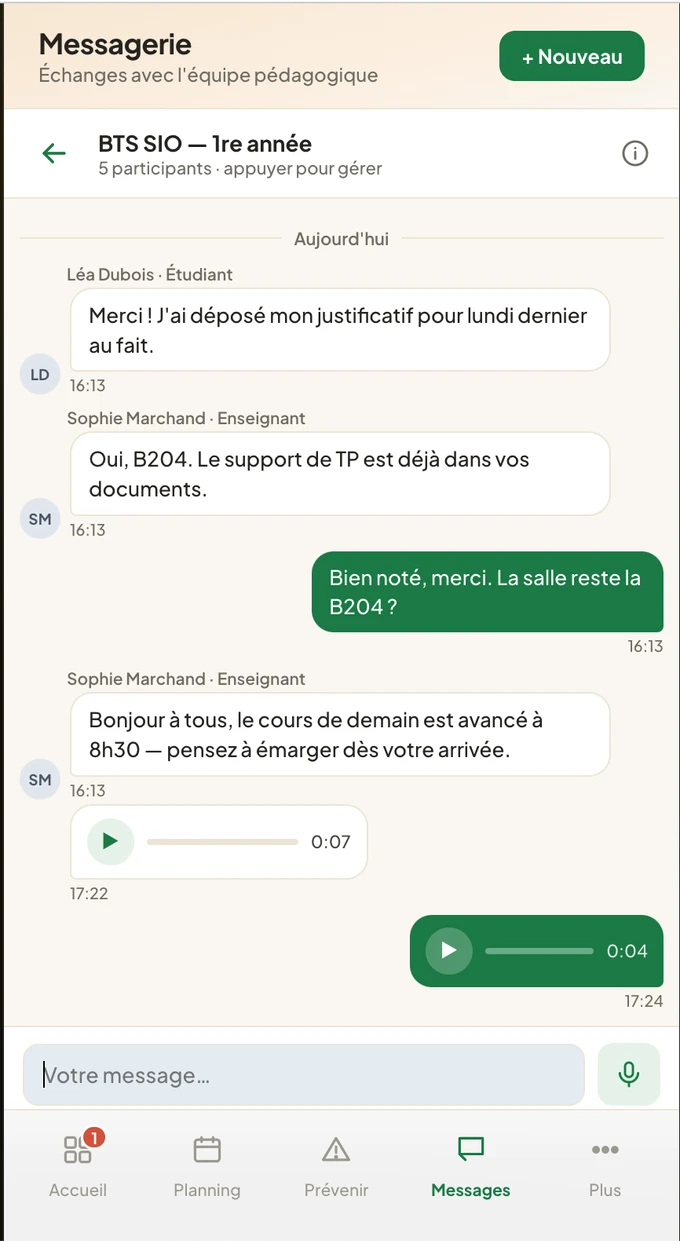
ScolaSign app, internal messaging: class thread with text and voice messages (player and duration), French interface
The question everyone asks

Why dedicated messaging rather than a WhatsApp group?

A consumer messaging group mixes work and private life, exposes everyone's phone number and is completely outside your centre's control. ScolaSign messaging keeps these exchanges within the training context.

Privacy protected

Messages go through ScolaSign accounts: nobody needs to share a personal phone number to talk to the class or the centre.

Under your brand

Messaging appears in your centre's app, with your logo. Communication stays professional and linked to your organisation.

One tool

Attendance, timetable, absence notes and messaging in one place: learners do not have to juggle several apps to stay informed.

In the console

Messaging built into your management console

For staff, messaging opens from the console, next to the timetable and sessions. Trainers and admin staff reply to learners without switching tools.

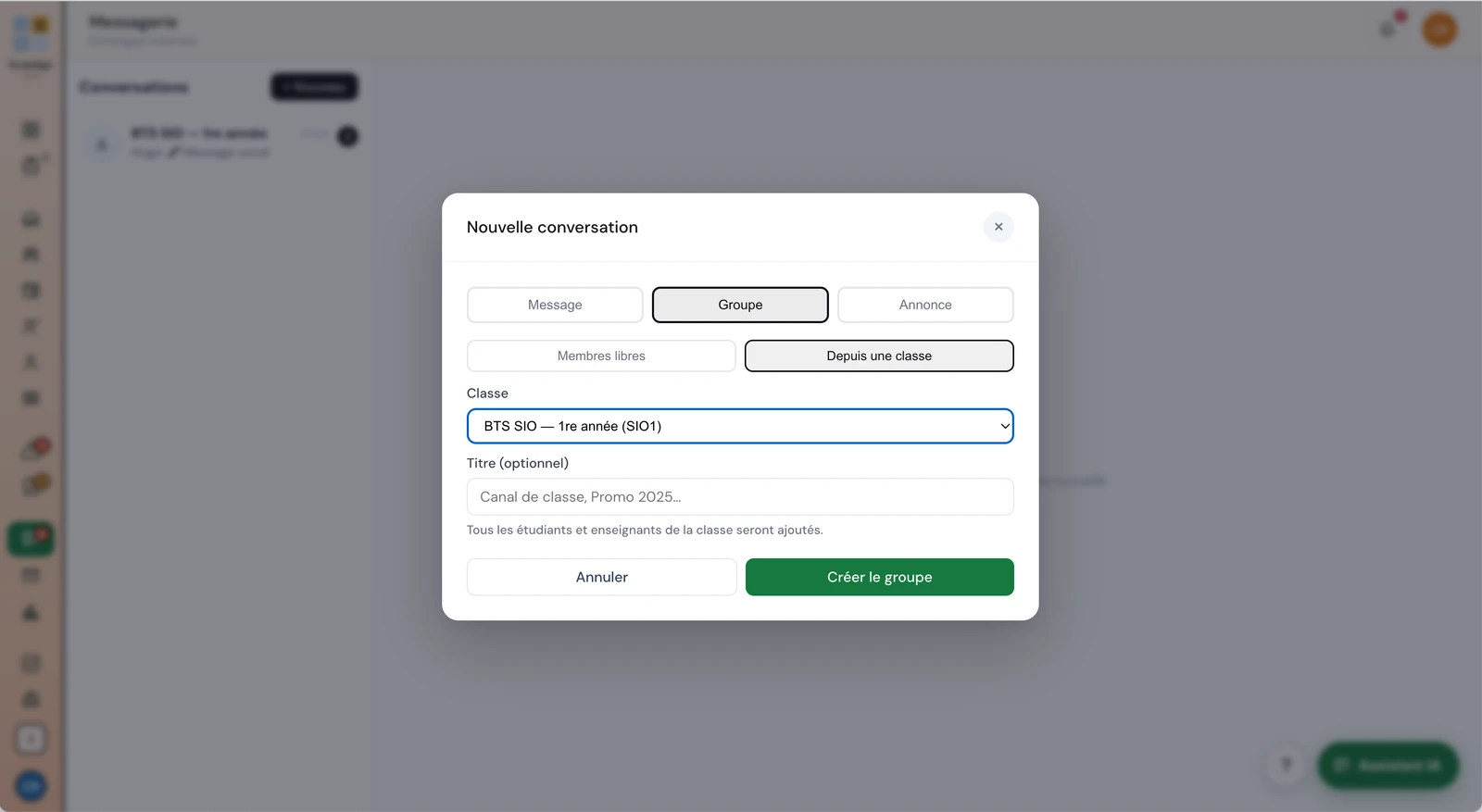
ScolaSign console, messaging: the New conversation window used to create a class channel (all learners and trainers of the class added automatically), French interface
Frequently asked questions

Messaging in brief

Do I need to install another app for messaging?

No. Messaging is built into ScolaSign: staff use it in the management console, and learners, parents, tutors and employers use it in the mobile app. It is the same platform you use for attendance, scheduling and absence notes. There is nothing extra to download or administer, and communication stays under your centre's name and logo rather than on a consumer messaging app installed on personal phones.

Who can message whom?

Messaging supports direct conversations between trainers, learners and admin staff, as well as between learners. A searchable directory of your organisation helps you find the right person. You can also create named groups (by class, project or cohort) and manage their members. All conversations stay within your organisation.

Do voice messages work on every phone?

Voice messages are recorded by pressing and holding the microphone button, and converted to a universal audio format when sent, so they can be played on a wide range of devices. Recording requires microphone permission, which is requested the first time. Hardware-dependent features may vary by model and operating system, so we recommend testing on your own devices before a wide roll-out.

Are messages received when the app is closed?

Yes. Messaging uses push notifications, which alert users to a new message even when the app is not open, provided they have allowed notifications. Everyone stays informed in real time without constantly reopening the platform. Actual delivery depends on the phone's notification settings and operating system.
Video

Messaging, announcements and polls

A thread keeps its full history, voice messages included, and an announcement reaches a whole class at once.

English narration and subtitles; the interface shown is the French one. All video tutorials →

One platform to take attendance and communicate

Try ScolaSign messaging with your own courses. 14-day free trial, no credit card required.

Log in

Access your account