← Attendance methods Attendance method

Contactless NFC attendance

An NFC tag in each room, a simple gesture with the phone: attendance is recorded instantly. Fast, fully self-service sign-in, with no equipment needed on the learner's side.

How it works

One contactless gesture, attendance recorded

From the room's tag to the timestamped attendance sheet: no paper, no roll call, no handling.

1Equip

The room gets its NFC tag

Each NFC room is created in the settings and attached to one site or shared between several.

2Tap

The learner taps with their phone

They hold their phone close to the room's NFC tag. Sign-in is instant, with nothing to type and no app to install.

3Record

Attendance is timestamped

Attendance goes straight into the timestamped attendance sheet, ready for your audits, as with the other methods.

Quick flows

Made for sites
already using badges

If your learners already use a badge to enter the building or the canteen, NFC extends a gesture they know. No camera, no app to open: hold the phone close and it is done.

  • Instant sign-in, ideal for quick flows and workshops
  • Compatible with NTAG213 tags, inexpensive and standard
  • NFC rooms per site or shared between sites
  • Electronic timestamp on every signature
Try it free →
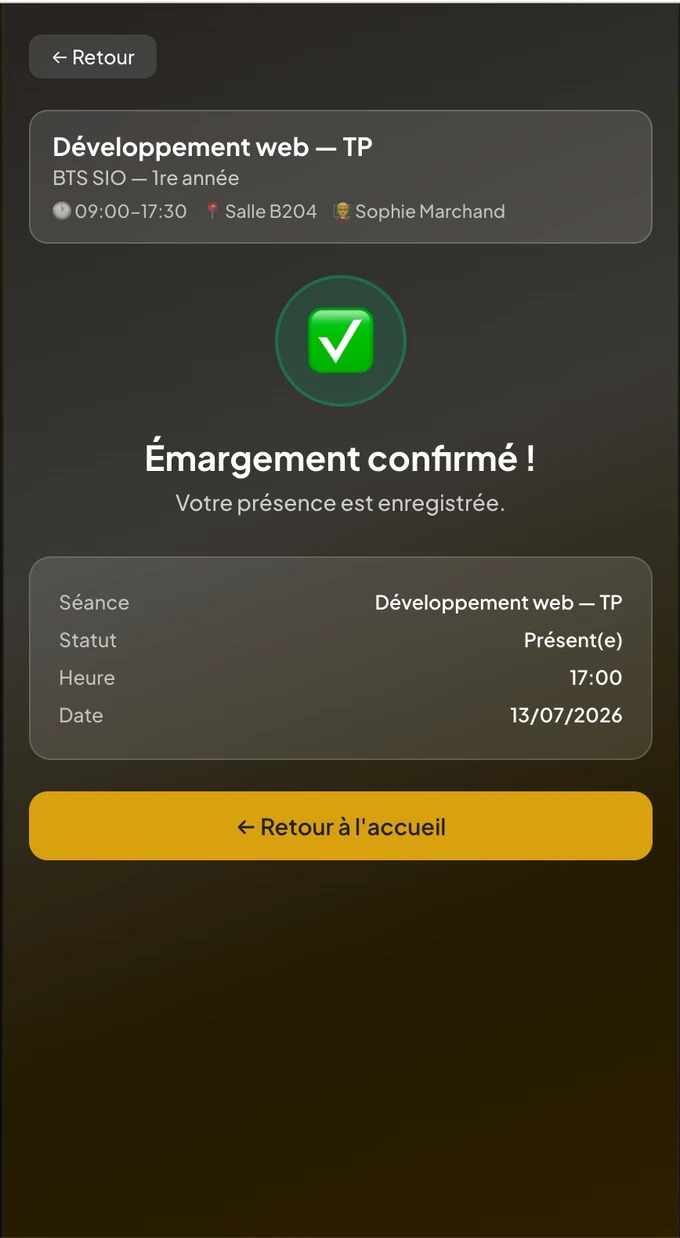
ScolaSign learner app: sign-in confirmed, attendance recorded with session, status, time and date

Compatibility: what NFC does, and what it does not do yet

NFC reading is fully available on Android phones and through dedicated readers. On iPhone, reading an NFC tag requires a native app built on Core NFC; it cannot be done from the browser as it can on Android.

Our native iPhone app is not yet published. So, for now, we do not present NFC on iPhone as available. If most of your learners use iPhones, use the dynamic QR code, which works on every smartphone, or the email link.

Choosing the right method

NFC combines with the other methods

You choose, session by session, the method that suits the context and your learners' devices. They all feed the same timestamped attendance sheet.

Frequently asked questions

NFC attendance: your questions

Does NFC attendance work on iPhone?

The honest answer has two parts. Reading NFC tags is fully available on Android phones and through dedicated readers. On iPhone, reading NFC requires a native app built on Core NFC: it cannot be done from the browser as it can on Android. Our native iPhone app is not yet published, so we do not present NFC on iPhone as available today. If most of your learners use iPhones, use the dynamic QR code, which works on every smartphone.

Which NFC tags are compatible?

ScolaSign works with NTAG213 NFC tags, a widespread, inexpensive standard that is easy to deploy to identify a room. Each NFC room is created in the console settings and can be attached to one site or shared between several. Learners need no equipment: their own phone reads the room's tag with a simple contactless gesture.

Is NFC sign-in valid evidence for an audit or inspection?

Yes. Every attendance recorded by NFC is electronically timestamped, just like the other methods. Its legal value rests on the EU eIDAS regulation (Article 25), which forbids rejecting a signature solely because it is electronic. NFC attendance feeds the same timestamped attendance sheet as the QR code or the email link, with traceability of the actual signatory. Your PDF, Excel and CSV exports therefore remain usable for audits and for whoever funds or inspects your training, whatever method was used for each session. ScolaSign was built to meet some of the strictest attendance-evidence requirements in Europe: France's Qualiopi quality certification and the audits of French public training funders. Those rules apply only in France, but the same rigour serves training centres and schools everywhere.

When should I choose NFC over the QR code?

NFC shines for quick flows and for sites already equipped with badges: a simple contactless gesture is enough, with no camera and no scan. It suits workshops, frequent comings and goings, or fixed rooms fitted with a tag. The dynamic QR code remains more universal, since it works on every smartphone, iPhones included, and covers both in-person sessions and video calls. Nothing forces you to choose a single method: ScolaSign lets you combine NFC, QR code and email link from one session to the next.

Video

The phone held to the room's tag

No handling: sign-in opens by itself. The sequence also shows the other methods, to place NFC among them.

See all the video tutorials →

Contactless sign-in
for your equipped rooms

Test NFC sign-in on your own courses. 14-day free trial, no credit card.