← Features Parents, tutors & employers

Parents, tutors and employers in the loop, without one more phone call

Parents of under-age learners, workplace tutors and employers of apprentices: ScolaSign gives them a dedicated space to follow attendance in real time, be notified of absences and upload absence notes, without your team spending its days on the phone.

How it works

Keeping parents, tutors and employers informed, automatically

You link a parent, tutor or employer to a learner once and for all. ScolaSign then passes on the information at the right time.

1Step 1

Link

Link each learner to one or more contacts: parent, legal guardian, workplace tutor. Each contact has their own space, limited to their learners.

2Step 2

Alert

Absence, lateness, unsigned session: the contact is notified in real time, without anyone having to pick up the phone.

3Step 3

Explain

The contact uploads the absence note directly from the app; the centre approves it in two clicks. The reason for the absence is recorded and dated.

Real-time tracking

Their learner's attendance, always up to date

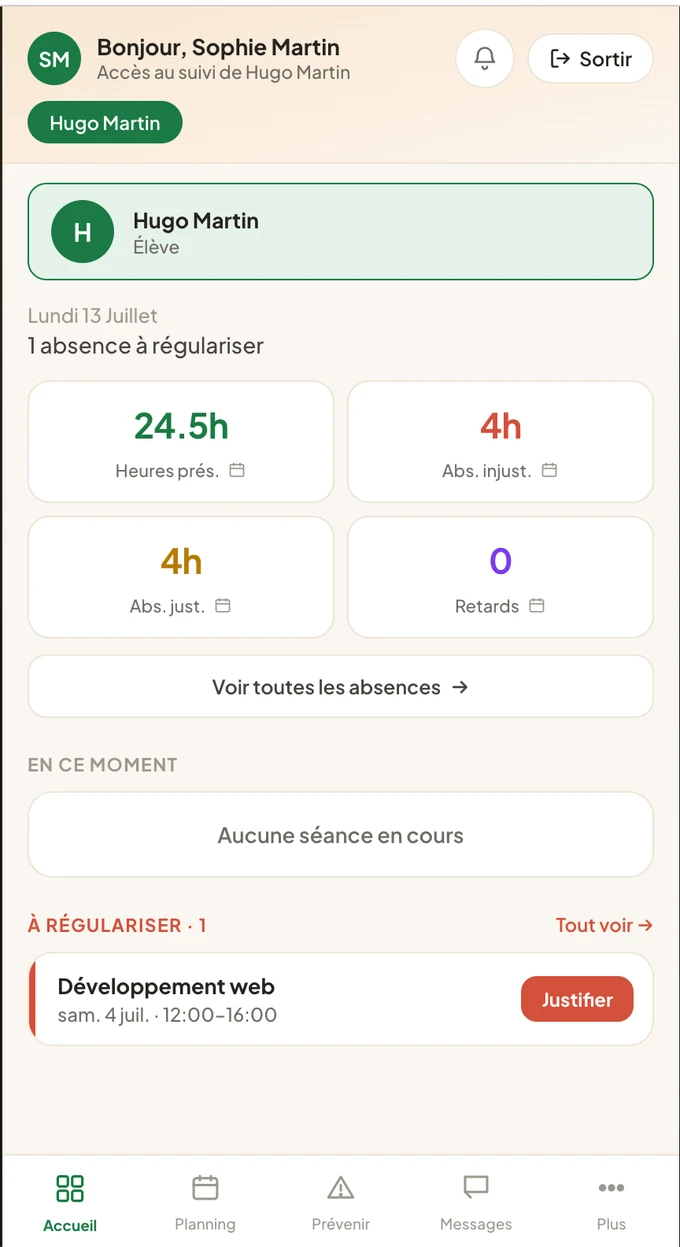
The parent, tutor or employer opens the app and sees at once where their learner stands: attendance, lateness, excused or unexcused absences, attendance rate. No more absence reports discovered three weeks too late.

  • Attendance view limited to their own learners
  • Notification for every recorded absence or late arrival
  • Clear history of attendance and reasons
  • Switch between learners, for siblings and for tutors with several apprentices
See the mobile app →
ScolaSign app, legal guardian space: the learner's attendance (hours present, excused and unexcused absences, late arrivals) and absences to be explained (French interface)
Absence reports & absence notes

Report and explain, in a few seconds

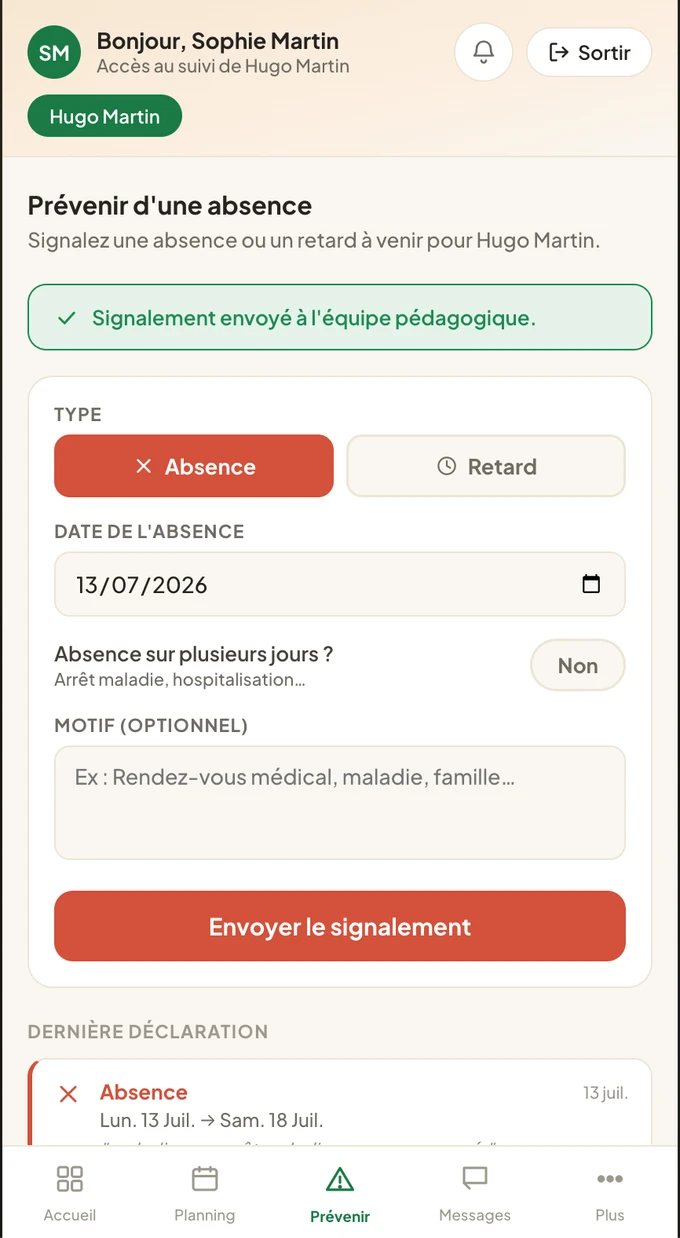
Something came up that morning? The parent, tutor or employer reports the upcoming absence and attaches the absence note from their phone. The centre gets the information at the right time, without scattered emails.

  • Advance report of an absence or late arrival
  • Absence note upload (photo, PDF) from the app
  • Approval by the centre in two clicks
  • Traceability: who uploaded what, and when
See absence notes →
ScolaSign app, legal guardian space: reporting an absence or late arrival in a few seconds, sent to the teaching team with the history of reports (French interface)
Go further

Around the parent, tutor and employer space

This space is built on the same foundation as the learner app and on paperless absence notes.

Frequently asked questions

Parents, tutors and employers: frequently asked questions

Can a parent or tutor see the other learners in the class?

No. Each parent, tutor or employer only has access to the learners linked to them. A parent sees their child; a workplace tutor sees their apprentice or apprentices. Other learners' data remains inaccessible.

Does a tutor who follows several apprentices need several accounts?

No. One person can be linked to several learners and switch between them with a selector, using a single account. This is useful for workplace tutors as well as for families with several children.

Can a parent or tutor sign in on the learner's behalf?

No. Their space is for tracking, absence reports and absence notes. Signing the attendance record remains the learner's act (or the trainer's, for their own session). Roles are kept separate.

Is a specific app required?

Parents, tutors and employers use the same app as learners, branded with your centre's colours. On Android, it is downloaded from Google Play; on iPhone, it is installed from the browser in a few seconds.

Video

The legal guardian's space

Several learners on one account, their attendance up to date, and the details of a day in one tap.

English narration and subtitles; the interface shown is the French one. All video tutorials →

Involve parents, tutors and employers, lighten your team's load

Try the parent, tutor and employer space free for 14 days and let information flow to them automatically.

Log in

Access your account